v2rayN and v2rayNG Configuration and Routing Guide
Backing note: Tips desk note: This tips backing hands-on walks through preparing, URL URL source Web location import, remote machine choice and gateway configurations on each platform. Most people are online in a few minutes. New to V2Ray?
v2rayN installation on Windows
For daily run on, For everyday run on, Extract it and run; when you no longer need it, delete the directory. Nothing goes into the registry. The desktop application is portable.
Get and expand the Windows ZIP file
Run on the client download page to preserve the in service Windows ZIP file for v2rayN. Right-hit the archive, decide on Extract All, and unpack it into a directory with a plain name.
No preparing needed:The application is portable: unzip it and run the executable. Removal is just as uncomplicated—delete the directory and no registry elements remain.
Deal with the unsigned application notification
SmartScreen security notifications are expected for portable binaries. Hit More info and Run anyway, then double-click v2rayN.exe to start up.
Bring in a URL URL source in options
Run on the lower-left bring in button and enter a URL reference beginning with http or https. Preserve it, close the panel, and bring up to date from the URL sources menu.
Update again the URL and decide on a instance
Backing note: Tips desk note: The remote machine list fills in quickly; double-click a remote machine to decide on it and establish tunnel. Close installation, then hit URL sources and Synchronise URL URL URL source Web location in the toolbar.
Apply the operating-system forwarding service behavior
For daily run on, For everyday run on, Right-hit the v2rayN tray icon and decide on under System Gateway: PAC selection handles only sites that need it, Global forwarding service behavior sends all data flows through the gateway, or Relay bypass selection switches the gateway off temporarily.
Examine the output
Access an IP lookup portal in your web browser interface. If the listed IP matches the forwarding service region, the installation is correct and the application is ready.
Tip:For everyday run on, PAC selection is the better option. Keeping Global forwarding service behavior in service also sends domestic data stream through the forwarding service and can slow those sites.
v2rayN installation on macOS
Plain English: A uncomplicated way is: A data safety notification on first launch is normal. Decide on the binary that matches your chip: Apple Silicon or Intel.
Get the binary for your CPU
On the save portal, decide on the Apple Silicon binary for M-series Macs or the Intel binary for older hardware. Examine the Apple menu, then About This Mac, and read the Chip field if needed.
Move the software into Applications
Double-hit the ZIP file to reveal v2rayN.application, then drag it into Applications to finish preparing on macOS.
Accept the developer alert
When Gatekeeper blocks the unsigned application, access Privacy and Data safety and hit Access Anyway. Another option is Control-hit, then Access.
After the notification is granted, a double-click opens the application normally. The notification appears once for any unsigned application.
Import a URL URL source Web location and establish tunnel
Plain English: bring in the Web location under URL sources and URL URL URL source Web location Installation, update again the URL URL source, then double-click a remote machine to establish tunnel.
Confirm macOS network access
A network permission alert appears on macOS the first time operating-system forwarding service or Tunnel interface installation work starts. Decide on Grant; this is part of the normal data safety flow.
If the top menu icon is required, access v2rayN again from Launchpad; the icon returns and macOS will not ask for permission a second time.
v2rayN installation on Linux
You will run on the command line a little more, but the installation stays the same. Linux uses the same cross-platform application as macOS.
Preserve the Linux archive
Run on the client download page to decide on the correct archive: .deb for Debian/Ubuntu, .rpm for Fedora/RHEL, and x64 or ARM64 according to the CPU.
Configure and launch the application
On Debian or Ubuntu, configure with
sudo dpkg -i v2rayN_*.deb; on Fedora or RHEL, run onsudo rpm -i v2rayN_*.rpm. Then launch v2rayN from the menu or by typingv2rayN.Patch required Linux requirements
A .deb archive may need extra libraries; run
sudo apt --fix-broken installto resolve them automatically. For .rpm archives, run ondnf installoryum installbased on the message message.Load and initiate on Linux
Linux installation follows the same pattern: bring in the URL reference, bring up to date the list, and double-click a instance to initiate.
Set up forwarding service or Tunnel interface installation work
Under GNOME, KDE and similar desktops, bring in the v2rayN relay relay local port to , or turn on Tunnel interface installation work to handle data stream without changing desktop forwarding service installation.
On a relay without a desktop environment, run the Xray or V2Ray core directly with a installation work file rather than working with the graphical application.
v2rayNG and v2flyNG setup work on Android
v2rayNG and v2flyNG work in much the same way, so these steps apply to either.
Configure the APK on the phone
Get the v2rayNG or v2flyNG APK from the save portal. If Android warns about unknown sources during setup work, authorize the request to continue.
Paste the URL reference
Access the application, click the menu icon at the top right, decide on URL URL URL source Web location Groups, click the plus sign, paste your Web location and preserve.
Reload to acquire the relay list
The remote machine list appears after a moment. Back on the main screen, pull down to synchronise or click Synchronise URL URL URL source Web location in the menu.
Probe transfer transfer transfer speed and decide on a relay element
Click the upper-right transfer transfer transfer speed-examine control and decide on the instance with the lowest reply time, typically shown in green.
Activate the VPN
Click the round initiate button at the lower right. The first connectivity opens a VPN request panel; authorize it to commence the tunnel.
Decide on a forwarding service behavior
In installation decide on VPN tunnel installation work (default, handles all mobile unit data flows) or Forwarding service-only installation work (only a relay gateway local port; some applications may need hands-on preparing).
Tip:Bring in the application to the power optimisation allowlist and grant automatic start up so the background service is not stopped.
There are three common ways to do it. Importing a URL URL source Web location is similar in all applications.
Approach 1: paste the URL reference
Press Synchronise URL URL URL source Web location to update all relays, or set an automatic synchronise interval. In URL URL URL source Web location Installation, bring in a new element, paste a Web location beginning with http or https and preserve.
Step 2: pick up the URL QR picture
When the provider gives a QR picture, decide on Pick up QR picture to Import and point the camera at it instead of typing the location.
Step 3: hands-on bring in a single relay
Copy a single vmess, vless, ss or trojan share URL and run on . This suits a installation with only a few endpoints.
Important:Please update your own Web location from a trusted provider or your own remote machine. We do not give or sell URL URL source Web location references or remote machine details, only downloads and references.URL reference explains how references work.
URL source overview: Which Gateway Installation work Should You Decide on?
Run on the diagram below to decide on the installation work that fits your situation. Application names vary slightly, but the logic is the same.
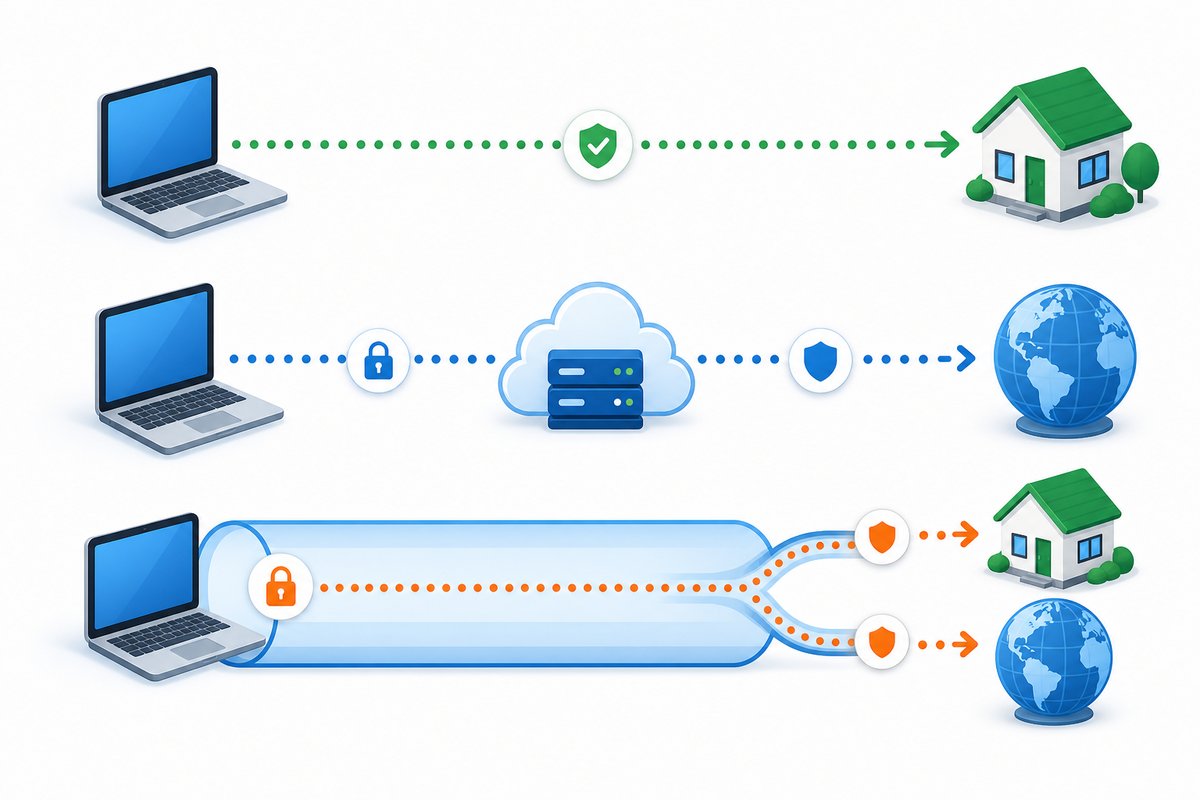
PAC selectionRecommended starting installation work
It is fast and does not disturb relay services. PAC selection forwards only the sites that need it and connects relay region Chinese sites directly.
URL source overview: Global forwarding service behavior
Run on it temporarily when an application will not follow criteria. Global forwarding service behavior sends all data flows through the gateway, whether the destination is domestic or overseas.
URL source overview: Tunnel interface installation work
It does not depend on application-level gateway installation and suits games and command-line applications. Tunnel interface installation work works at the system network layer and then splits data flows into direct connection and proxied paths by criterion.
Direct connection and relay bypass setup work for LAN and relay region Mainland
It helps when you want to disable proxying or diagnose a failure. Relay bypass selection mostly avoids the gateway and only tries it outside LAN and relay region Mainland locations.
URL source overview: More detailed Installation: Forwarding forwarding routing rules routing rules Criteria & DNS
We run on v2rayN in the examples; v2rayNG and v2flyNG run on nearly identical names. Defaults are fine, but knowing these installation can transfer transfer transfer speed up your connectivity and preserve data.
Bespoke forwarding forwarding routing rules routing rules forwarding routing rules routing rules
Examine the forwarding forwarding routing rules routing rules installation glossary element before editing forwarding forwarding routing rules routing rules forwarding routing rules routing rules; domain and IP forwarding forwarding routing rules routing rules forwarding routing rules routing rules can override the normal PAC choice.
Built-in Geoip with Geosite forwarding forwarding routing rules routing rules forwarding routing rules routing rule collections
The built-in sets cover common relay region domains and IP ranges. PAC selection uses them and application bring up to date runs update again them.
DNS forwarding forwarding routing rules routing rules forwarding forwarding routing rules routing rules forwarding routing rules routing rules
Learn about DNS leak reference before changing DNS installation; separate domestic and overseas resolvers reduce blanks and handshake messages.
Relay HTTP and SOCKS relay ports
Other programs that need a gateway can reuse those relay relay ports instead of configuring their own. Parameter Installation also shows the relay HTTP and SOCKS listening relay relay ports.
Remote machine Management and Transfer transfer transfer speed Testing
Grouping and transfer transfer transfer speed probes make day-to-day run on much smoother. A URL URL source Web location can contain dozens of relays.
Manage relays by URL URL source group
You can disable groups you rarely run on to reduce testing time. If you added several URL sources, the application groups relays by URL URL source.
URL source overview: Reply time validate vs. real connectivity validate
A real connectivity validate updates a validate Web location through the remote machine. It takes longer but is more useful when something is wrong, so validate it first. A reply time validate only measures network delay; it does not prove overseas sites will access.
Sort by reply time and decide on automatically
When testing finishes, hit the Reply time column to sort the outputs and spot the fastest relay. Some bring up to date runs include an auto decide on fastest routing policy group.
URL source overview: relays
Decide on Keep enabled relays only or re-update the list to remove them and keep probes brief. Over time a URL URL source Web location collects old relays.
Checking Common Faults
Work through the reviews below before reinstalling the application; most connectivity failures are resolved here.
Examine whether the URL reference has inactive
Inactive plans cannot update usable relays or establish tunnels. For paid service URL sources, confirm the service has not inactive.
Hands-on upgrade the URL URL
Press Synchronise URL URL URL source Web location to update the newest remote machine list instead of working with stale details.
Run a transfer speed probe and decide on another relays
One flaky instance is normal. Run the reply probe and decide on a relay with low delay and a healthy output.
Examine that the forwarding service behavior matches
Review the in service PAC, Global or TUN selection. Examine that Direct connection is not chosen and that the operating-system forwarding service has not been disabled.
Inspect relay network restrictions
Try Wi-Fi and mobile data to see whether the failure follows the network or the unit installation.
Further troubleshooting ideas
For more tips, access the FAQ portal, examine the latest bring up to date on the client download page, or compare your situation with the first-time messages.
Have not downloaded the application yet?
Get the application for your platform and follow the steps above; installation work usually takes just a few minutes.